Creating a companion has always been about getting the details right. The face, the personality, the way she talks to you. With this update, two of the most requested controls are now built directly into the creator, so the companion you imagine and the companion you end up with finally feel like the same person.
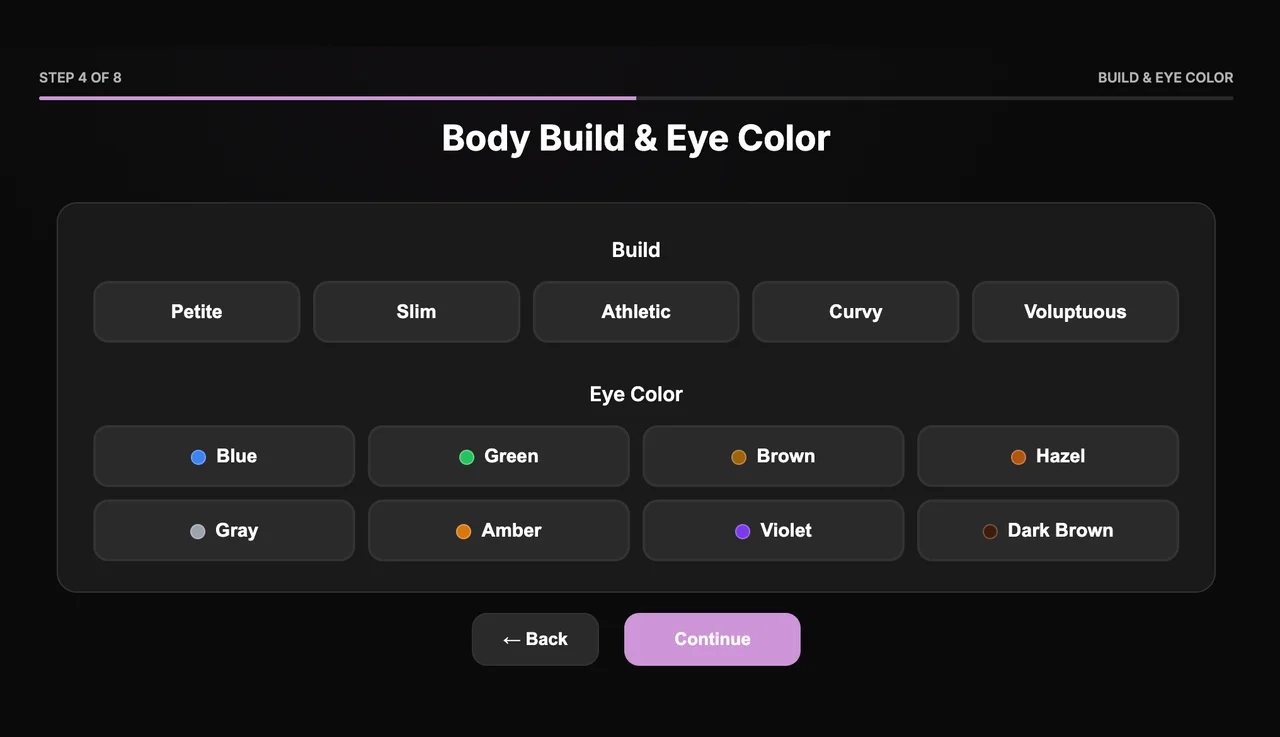
You will find both options in step four of the creation flow, under Body Build and Eye Color. They sit right next to the choices you already make for style and appearance, so nothing about the process gets slower or more complicated. A few extra taps, and the result is noticeably more you.
Choose a body type that fits your taste
Body build now offers five distinct options: Petite, Slim, Athletic, Curvy, and Voluptuous. Each one shapes how your companion is generated across images and chat, so the look stays consistent every single time you create something new.
This matters more than it might sound. Before, two people creating very different companions could still end up with results that felt a little too similar to each other. Now the body type you pick carries through everything, giving every companion a clearer identity from the very first image you generate.
It also makes the creator feel more like a real design tool. Instead of hoping the result lands somewhere close to your idea, you set the foundation up front and build from there. The companion becomes a deliberate choice rather than a lucky draw.
Pick the perfect eye color
Eyes set the whole tone of a portrait, so we added a full palette to choose from: Blue, Green, Brown, Hazel, Gray, Amber, Violet, and Dark Brown. Whether you want something natural and warm or something striking and unusual, there is an option that fits the mood you are going for.
Like body build, eye color stays consistent across everything you generate. Pick violet once and your companion keeps those eyes through every pose, outfit, and scene you create later. That continuity is what makes a companion feel like a real character instead of a fresh roll of the dice each time.
The smaller, unusual options are worth experimenting with too. Amber and violet in particular give a companion a memorable, distinctive look that you will recognise instantly the next time you open a chat.
A sharper result with HD
Alongside the new controls, the creator now includes an HD option for extra crisp images. When you want a portrait with more clarity and finer detail, turn it on and the result comes out sharper, with cleaner edges and richer texture throughout.
HD pairs naturally with the new appearance controls. Once you have shaped a body type and chosen an eye color you love, the extra clarity makes those choices really stand out, so the time you spent dialing things in actually shows in the final image.
Putting it all together
These three additions work as a set. Choose a body type, set the eye color, switch on HD, and the companion you build feels intentional rather than random. It is a small group of controls, but the difference in how personal the result feels is hard to overstate.
Made for everyone, not just experts
You do not need any design skill to get a result you love. The options are presented in plain language, with clear choices rather than fiddly sliders, so anyone can shape a companion that feels right on the very first try.
That accessibility is deliberate. The best creative tools are the ones that get out of your way, and these controls are designed to feel obvious the moment you open them.
Open the creator and try it on your next companion. Once you have shaped a look that is genuinely yours, every image and conversation that follows lands a little differently, because it finally looks like the person you had in mind all along.